
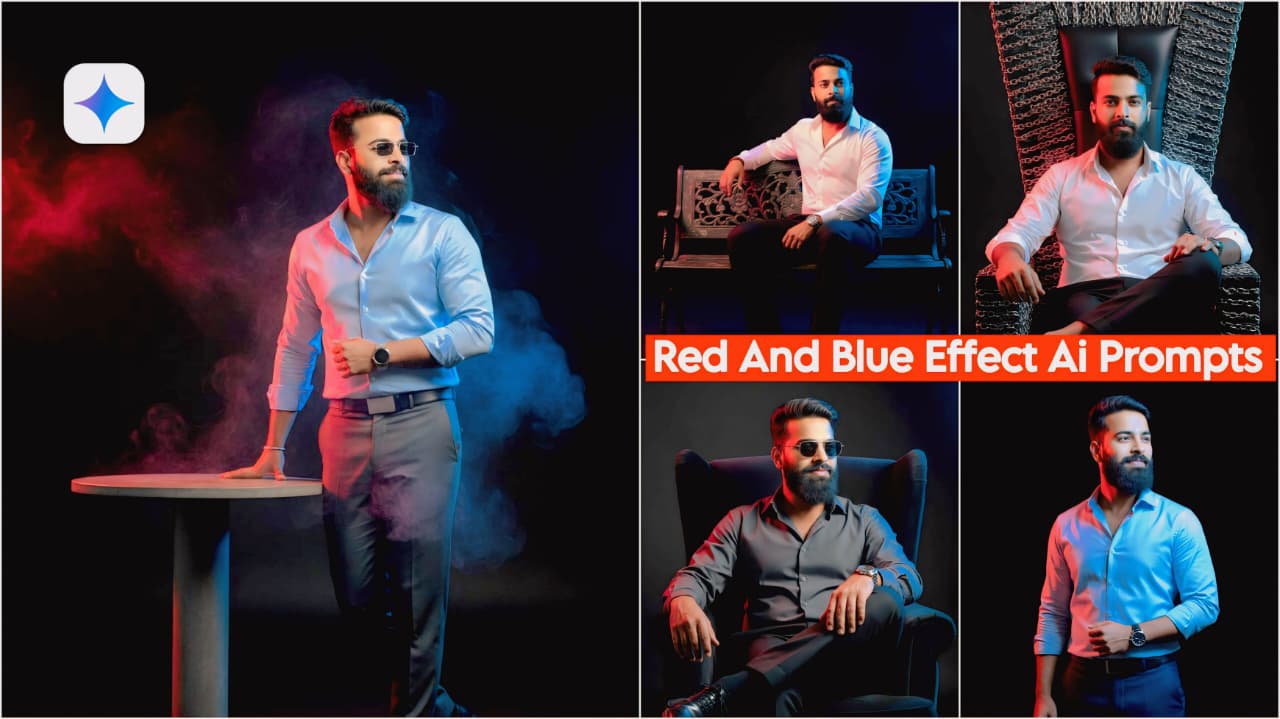
Trending New Google Gemini Ai Prompts, I have created a trending prompt which is very good, nowadays many people are using it and making such photos, so now you can also make it, people use Google Gemini and by using this prompt they are able to make their photos in a better way, so now you can also make a photo with side effect, in today’s blog I am going to tell you how you can make and use your photo by using this prompt, all the details are given in it.
My name is Manish. Welcome to my website, dmeditz, and you can also check out my YouTube channel. I post all my editing tricks and tips, so you’ll find a link on the home page. If you have any questions or concerns about editing, please let us know. Please contact us. Let me explain. Let me explain in detail.
About the Trending New Google Gemini AI Prompts
Friends, I’ve given you a total of 10 prompts in different poses and locations, so you can see and understand them, which is quite good and better, so you should definitely try it once. I’m explaining them step by step, one by one, it’s very good. You can also try it and transform your photos in one click. You can post them on your Instagram and Facebook and get millions of views and likes.
- If we look at the first photo, he is standing in a side pose and there is a blue colour effect on one side and red colour effect on the other side which looks quite good.
- If you look at this, you are standing in a normal standing pose, smiling with both hands behind your back, and there is a red-blue effect from the side.
- Talking about this photo, it shows a full body of you in a formal dress with shoes, and the black side of the back has a red-blue color.
- In this you will see the same photo frame and he is standing wearing a suit and pants, there is a red blue effect on the black side behind.
- If you look at it, it’s a full photo, along with a white shirt and gray pants, shoes, and a side view. The black side of the back has a red-blue effect, which is quite nice.
- If you look at it, he is sitting in a formal dress made of king-size chain, and the side view is of a red-blue effect on the black side behind, which is a very nice matching.
- Talking about this, it’s a very nice photo. He’s sitting on a chair made of king-size chains. He’s looking straight ahead, with his legs crossed. The black side has a red-blue effect.
- Talking about this photo, you are wearing a grey shirt and black pants, which gives a very nice look. He is sitting with his legs crossed, holding a watch in his hand, and the side view is in the background. The black side has a red-blue effect.
- If we look at it, there is a long sofa which is very nice and the person sitting in the side pose is giving a very cool look, there is a slight smile on his face as well and there is a red blue effect on the black side behind it.
- Talking about this prompt, it shows a man sitting on a large sofa wearing glasses. The look is quite stunning, with a flower frame, wearing a suit, pants, and shoes. The back has a red-blue effect on the black side.
Trending New Google Gemini Ai Prompts

"A young man with a realistic, changing face, standing in a formal pant shirt with a watch and shoes. Black background with a blue light effect from the right side and a red light effect from the left side. He has a slight smile and a handsome look, in HD quality with light focused on his face. Clear face and cinematic lighting." Don't change faces
Ultra-realistic portrait, young man, slight smile, looking directly at the camera. He wears a formal shirt and trousers with dress shoes and a classic watch. He is in a standing pose, hands resting behind his waist. The background is solid black. The scene is illuminated by striking color contrast: Red light coming from the left, and a cool Blue light casting from the right, creating a dramatic dual-tone effect. HD quality, professional studio lighting, clear face, handsome, sharp focus. Don't change faces
A hyper-realistic, full-body portrait of a handsome young man in a standing pose. He is wearing a crisp formal dress shirt, tailored pants, leather shoes, and a wristwatch, and is leaning his arm onto a long, polished black table. The background is a stark, black void.
Lighting is intensely dramatic: Cinematic split-lighting features a strong, vibrant electric blue light as the rim/fill from the right, and a deep crimson red light from the left. A focused key light highlights the face, emphasizing clear facial features and a slight, confident smile. 8K resolution, shot on an Arri Alexa, intense detail, detailed skin texture. Don't change faces
A photorealistic, fashion-forward portrait of a young man in a black formal suit (pants and shirt), standing next to a minimalist, long table. He has a subtle, engaging smile and a handsome, clear-faced look.
The mood is defined by a dramatic neon split-tone effect on the subject: the right side is saturated with a brilliant blue glow, and the left side is bathed in a deep red hue. The face is brightly lit with a key light for extreme clarity. Studio setup, black background, high definition, detailed texture, volumetric lighting. Don't change faces
A highly realistic portrait of a handsome young professional. Formal attire (shirt, pants, watch, shoes). Standing pose, resting arm on a minimalist round table. Black void background. Shattering light effect: Intense Red VS Blue** color grading, with distinct illumination on the left and right sides of the body and face. The face is clearly defined and focused, sharp, subtle smile. Cinematic smoke effects, high contrast, studio photography, octane render. Don't change faces
"A young man with a realistic, subtly changing face, sitting on a long chain. He is wearing a formal pant shirt, watch, and shoes. The background is black, with a blue light effect from the right side and a red light effect from the left. He has a slight smile and a handsome look. HD quality, cinematic lighting with a clear focus on his face." Don't change faces
A hyperrealistic, close-up portrait of a young man with subtly unique facial features. He is seated in an imposing, throne-like chair with dark, metallic chain-texture upholstery. He wears crisp formal attire: a tailored dress shirt, black trousers, leather dress shoes, and a sleek wristwatch visible. The background is a deep, matte black void. Dramatic split lighting illuminates the scene: an intense electric blue light hits the right side of his face and body, contrasting with a vibrant crimson red light from the left side. He has a subtle, confident smile and an intense, handsome gaze. Cinematic, clear face focus, 8K, ultra-detailed, volumetric light, photorealistic. Don't change faces
Ultra-detailed portrait of a young man with refined, unique features, seated on a high-backed chair. Formal shirt and trousers, watch, and shoes. Pure black backdrop. Extreme contrast lighting with a sharp blue light source on the right and a deep red light source on the left. Slight smile, handsome, clear, sharp focus on the face. Cinematic realism, 16K. Don't change faces
A hyper-realistic, high-detail full-body portrait of a handsome young man with a clear, focused face and a subtle, confident smile. He is sitting back with a powerful attitude on a long, dark, ornate chair or bench. He is wearing a crisp, tailored dress shirt, formal pants, dress shoes, and a luxury wristwatch. The background is a clean, solid black. The scene is lit with dramatic cinematic split lighting: an intense blue light source from the right, and a contrasting deep red light source from the left. Key light is focused directly on the face. Volumetric light, 8k, photorealistic, ultra detail. Don't change faces
Photorealistic portrait of a young man, handsome face, subtle smile, sitting on a long chair in formal attire (suit, watch, shoes). Solid black background. Dramatic split lighting: Blue light on the right, Red light on the left. High detail, light focus on face, 4k. Don't change facesTrending New Google Gemini Ai Prompts – Red And Green Effect Ai Prompts
How to Use Trending New Google Gemini AI Prompts
First, you need to look at all the prompts in it, which are in different poses. You need to copy whichever one you like. Then follow the step-by-step instructions.
- You must download Google Gemini; I’ll provide the download option below.
- After downloading, you’ll need to login with your Gmail.
- Then, click on the photo option in the chat option below and add your photo.
- After adding the photos, copy the prompts from here and paste them here.
- Once the prompts have been added to both photos, send them. Wait a while for the editing to complete.
- Your photo with the trending new Google Gemini Ai prompts will be ready, and you can use it on Instagram, Facebook, or anywhere else.
Conclusion
Friends, in this article we have told you how to use the trending new Google Gemini Ai Prompts and what is Google Gemini and what are Prompts, I have told you all these topics so that you do not face any problem, apart from this if you have any problem then you can tell me in the comment and if you need any kind of Prompts then tell me, I will definitely help you.
Google Gemini App Click And Use


Super bro
Nice 👍 edit
Can you tell us more about this? I’d want to find out more details.
yes tell me